AI Readiness for Austin and Central Texas businesses
Get identity, sharing, devices, and data boundaries ready before new AI tools go on. That is AI Readiness for Austin and Central Texas.

Useful AI without losing control of business information
AI Readiness fits organizations that want approved tools and clear rules before Copilot, meeting assistants, or other add-ons go wider. That includes clinics, manufacturers, professional firms, and other teams in Austin and Central Texas.
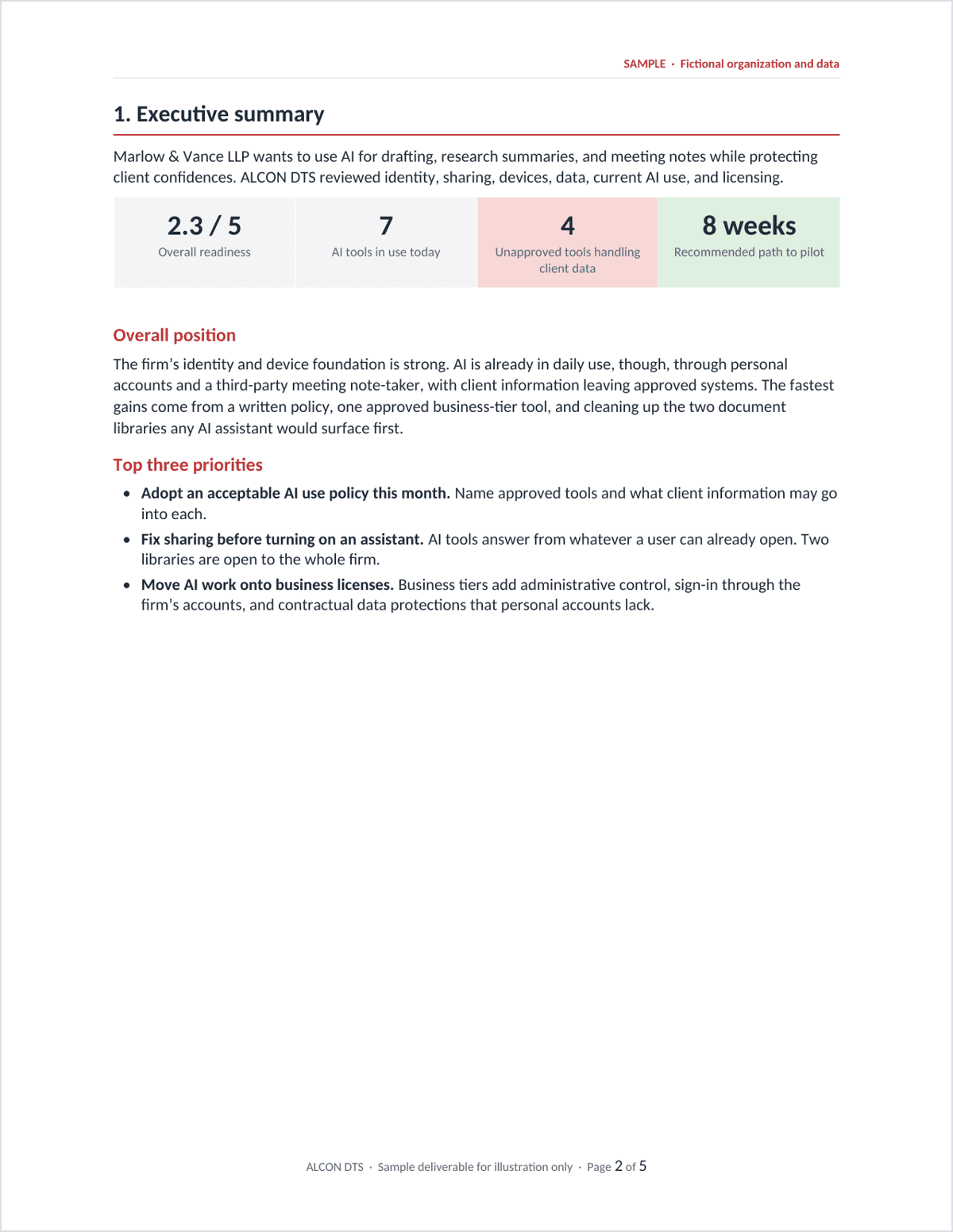
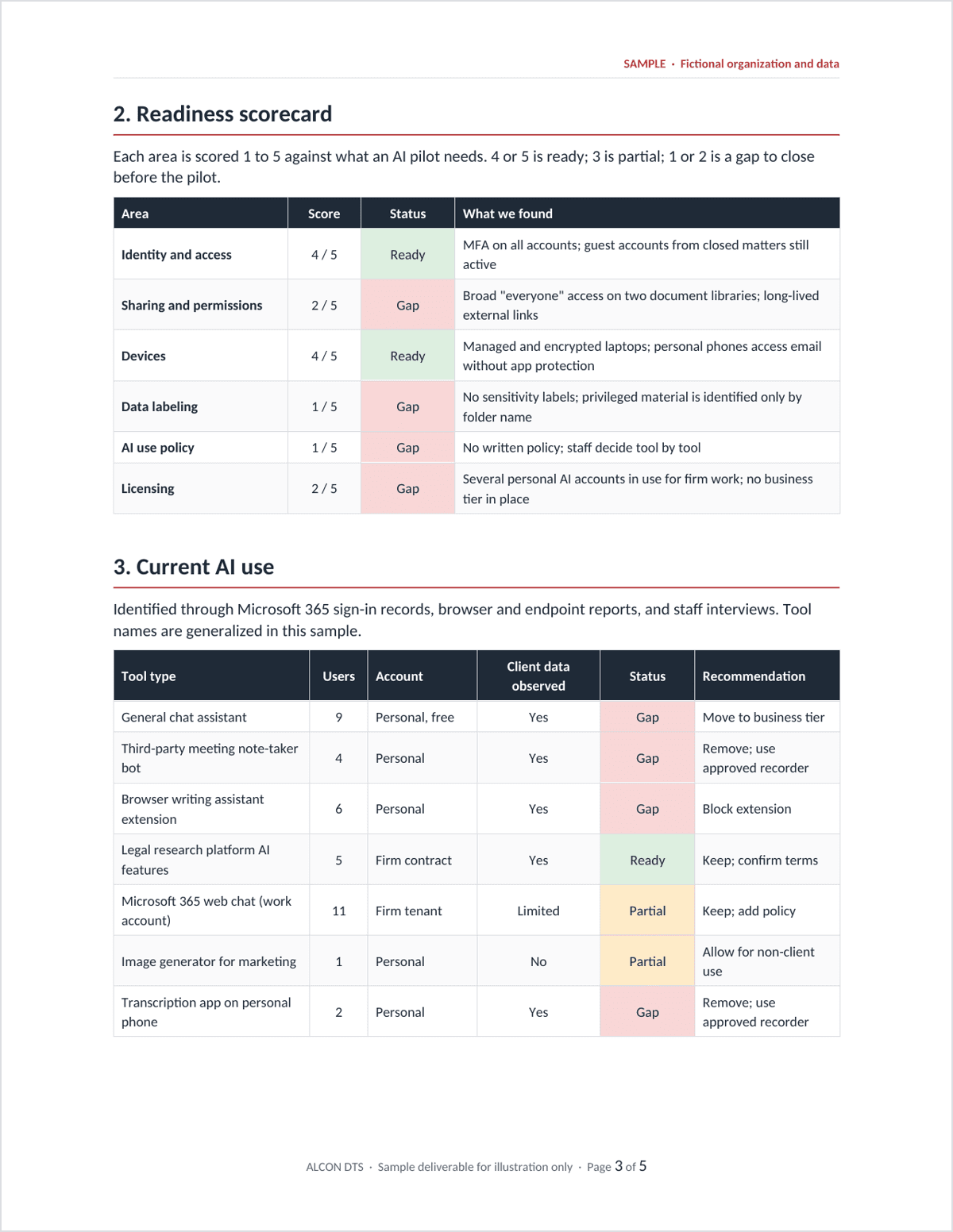
Staff may already be using public AI sites. The work is to see that use, name what is approved, and close the gaps that would send business information to the wrong place.
AI Readiness sits on managed IT or managed Microsoft 365. It does not replace Healthcare IT or Cybersecurity.
What ALCON DTS assesses
The review looks at the environment you already run. You leave knowing what can proceed, what should be fixed first, and which tools and data stay in approved systems.
Identity and access
Who can sign in, who has admin rights, and how access changes when people join, move, or leave. Guest access and service accounts are part of that picture. Approved assistants should only see what those permissions already allow.
Sharing and collaboration
SharePoint, OneDrive, Teams, and external sharing. “Anyone with the link” and stale permissions are common. The question is what an approved tool would see if it were turned on tomorrow.
Devices and endpoints
Windows, macOS, iPhone, and iPad used for work. Updates, protection, encryption, and which apps are approved. Business information on those devices should stay in the same standard as the rest of IT.
Data classes and current use
Patient information when it is present, plus HR, financial, legal, client, and proprietary files. Which tools and add-ons are already in use, and where that information is going today.
Why readiness comes first
New AI tools do not create a new lock on your files. They use the permissions already in place. If a file was shared too widely years ago, an assistant can surface it in a few seconds.
That is why a license is not the first move. Public AI sites, meeting assistants, and Copilot all make existing access visible. Readiness is the work of seeing that access, naming what is approved, and closing the gaps before more people get the tool.
Your team can still use AI. The point is that business information stays in approved systems while they do.
How implementation runs
The review comes first. We look at sign-in, sharing, devices, and how the team already uses AI. You see what is safe to pilot and what should be cleaned up first.
Then we agree the rules. Acceptable use names what is approved and what stays out. Identity and sharing gaps that would make a pilot sloppy get closed. The tool goes to the people who should have it, not to the whole company on day one.
Copilot is one path, not the only path. Some teams only need rules for public sites and meeting assistants. Some are ready for a small Copilot pilot. EHR, line-of-business platforms, and legal obligations stay with their owners. See Acceptable AI Use.
Related work
Start with a review
A review of your needs and growth plans looks at identity, sharing, devices, data classes, and how the team already uses AI. You leave with priorities and a picture of how the relationship would run.
From there, your team has an ongoing support relationship, not a one-off project.
AI Readiness is a review and a rollout plan. Day to day support stays on Remote IT, Complete IT, or Secure IT.
FAQ
Is this only for clinics?
Do we have to buy a new AI product?
What if staff already use public AI sites?
Does this replace Healthcare IT or Cybersecurity?
Start with readiness, not a license.
Your team gets a clear view of identity, sharing, devices, and data boundaries before new AI tools go on.